Dependencies are specified in the Workflows section of journey files
They control the execution order, data and attributes made available to each Workflow.
The dependency needed per attribute can be found in Attribute Reference
Dependencies control both:
- what is waited for to complete before running
- what is loaded for a Workflow to use
Example: Journey with Dependencies
Dependencies take the form: {step_name}.{dependency} , where:
- step_name:
- if within the current step: is omitted in the UI, and called LOCAL in text view
- another step: called explicitly by its name
- See Importing from another step
- dependency:
- one of the following from table
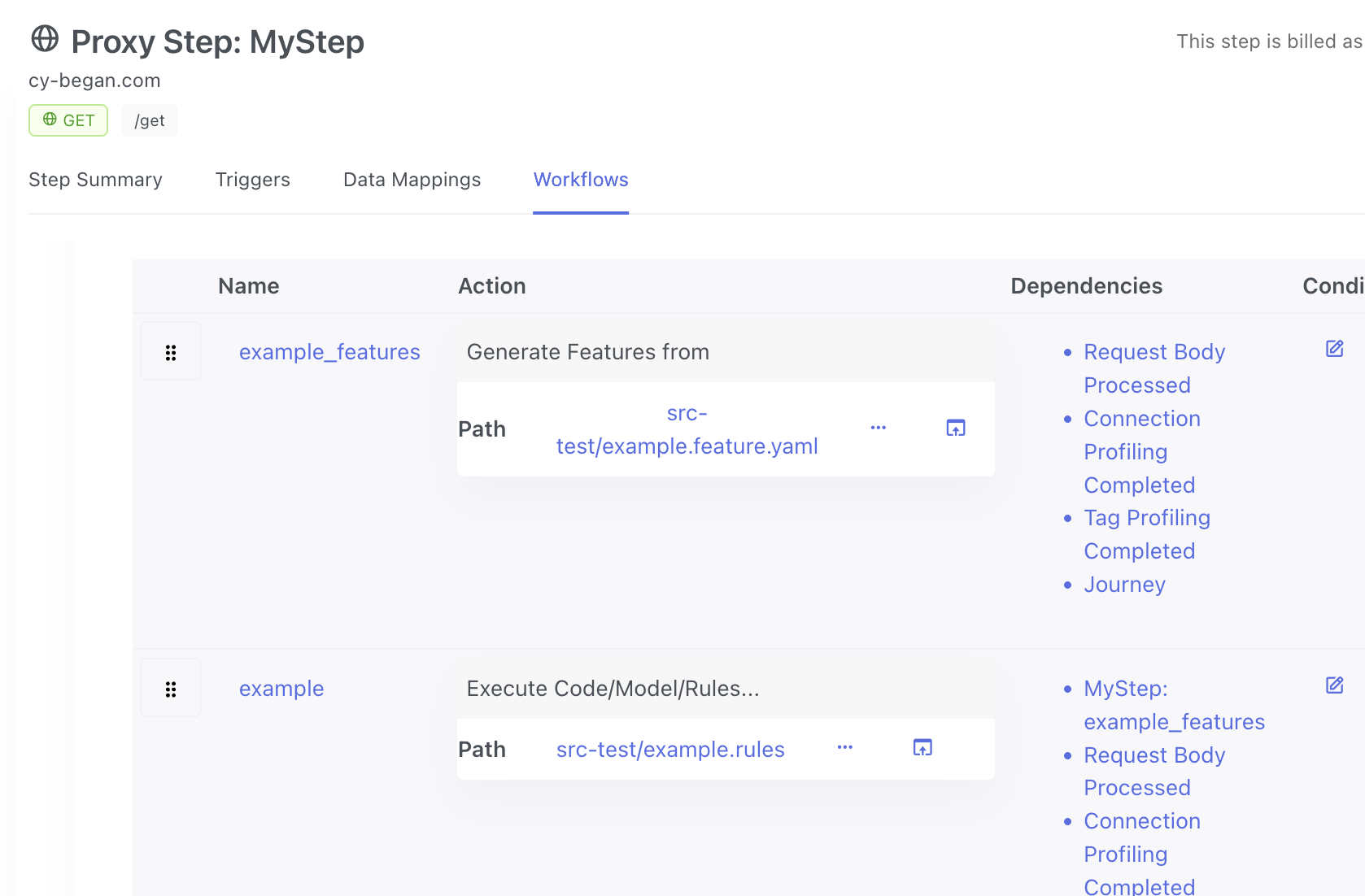
    models:
      - name: example_features
        dependencies:
          - LOCAL.REQUEST
          - LOCAL.CONNECTION
          - LOCAL.PROFILING
          - LOCAL.JOURNEY
        generate_features_from: src-test/example.feature.yaml
      - name: example
        dependencies:
          - MyStep.example_features
          - LOCAL.REQUEST
          - LOCAL.CONNECTION
          - LOCAL.PROFILING
          - LOCAL.JOURNEY
        execute_code: src-test/example.rules
-
When warnings are present, features and rules may not work as expected.
A warning (in yellow) in the UI highlights where:
-
attribute is attempted to be used
-
without specifying the dependency to use it
Dependencies reference
| Dependency | Step | Description | Common Attributes |
|---|---|---|---|
| REQUEST_HEADERS Request Headers Processed |
Proxy only | Attributes contained or extracted from the request headers. | step_url step_method cookies profiling.device.user_agent profiling.tcp_connection[PRIMARY].ip_address Anything extracted in Data Mappings > Request Header |
| REQUEST Request Body Processed |
Proxy only | Attributes contained or extracted from the request body. These are often in JSON payload and have attributes that are extracted to in Request > Data Mappings. | Anything extracted in Data Mappings > Request Body. Possible examples: identity[ACCOUNT].customer_token.customer_token identity[ACCOUNT].email[PERSONAL].email |
| CONNECTION Connection Profiling Completed |
Proxy only | Attributes that are resolved from encrichment of connection information including wurfl, TCP profiling and ipinfo enrichment lookups for IP addresses | profiling.wurfl.is_robot profiling.tcp_connection[PRIMARY].connection_type profiling.tcp_connection[PRIMARY].ipinfo.country profiling.tcp_connection[TcpConnectionContext].ipinfo.asn |
| PROFILING Tag Profiling Completed |
All | Attributes contained within the Darwinium profiling blob, regardless of via Javascript profiling or mobile SDK profiling. If no dwn-profiling blob is present, like with all dependencies, it will not be waited for. |
profiling.device.identifier profiling.ios.screen_res_x profiling.android.screen_res_x profiling.javascript.screen_res_x |
| JOURNEY Journey |
All | Attributes that contribute to resolving the journey_id, and the journey_id itself. The journey_id is resolved from session cookie, primary_session_tie/secondary_session_tie/auth_token_tie. | journey_id journey_start_timestamp time_since_last_step |
| JOURNEY_MODEL Journey Model Completed |
All | Journey signature and probability models | outcome[CHAMPION].journey_model[DEFAULT].step_dsh.identifier outcome[CHAMPION].journey_model[DEFAULT].journey_dsh.identifier outcome[CHAMPION].journey_model[DEFAULT].step_probability |
| RESPONSE_HEADERS Response Headers Processed |
Proxy only | Attributes contained within the response headers back from your origin. A common pattern is to set event_type depending on http_response_code (example: account_login_failed if http_response_code ≥ 400 |
http_response_code Anything extracted in Data Mappings > Response Headers, eg: Possible examples: custom.general_purpose[‘redirect’] |
| RESPONSE Response Body Processed |
Proxy only | Attributes contained within the response body back from your origin. | Anything extracted in Data Mappings > Response Headers, eg: Possible examples: custom.general_purpose[‘message’] custom.general_purpose[‘customErrorCode’] |
| <custom_workflow_name> eg: my_features my_rules my_model |
All | Any other workflow like ruleset, features or model can be referenced by Name too. A typical pattern is to have a ruleset that has a features dependency |
MyStep.my_features MyStep.set_request |
Why?
Dependencies enable the Darwinium orchestration to optimise the Step execution to be as efficient by utilising concurrent processing.
For example Models or Feature Sets are not dependent upon each other, then they can be processed in parallel (concurrently) meaning that the duration to compute the outcome is significantly reduced (optimised).
The opposite is true for serial processing, where each task is processed one after the other, which results in the longest (unoptimised) execution path.
Worked Example
The Feature Set "Identifier Age Features" produces a set of "Time Since First" Features which contain the ages of various Identifier attributes in days.
The Model "Identifier Age" examines the "Identifier Age Features" Feature Set and produces a Score relative to the age and historic pairings of the Identifiers.
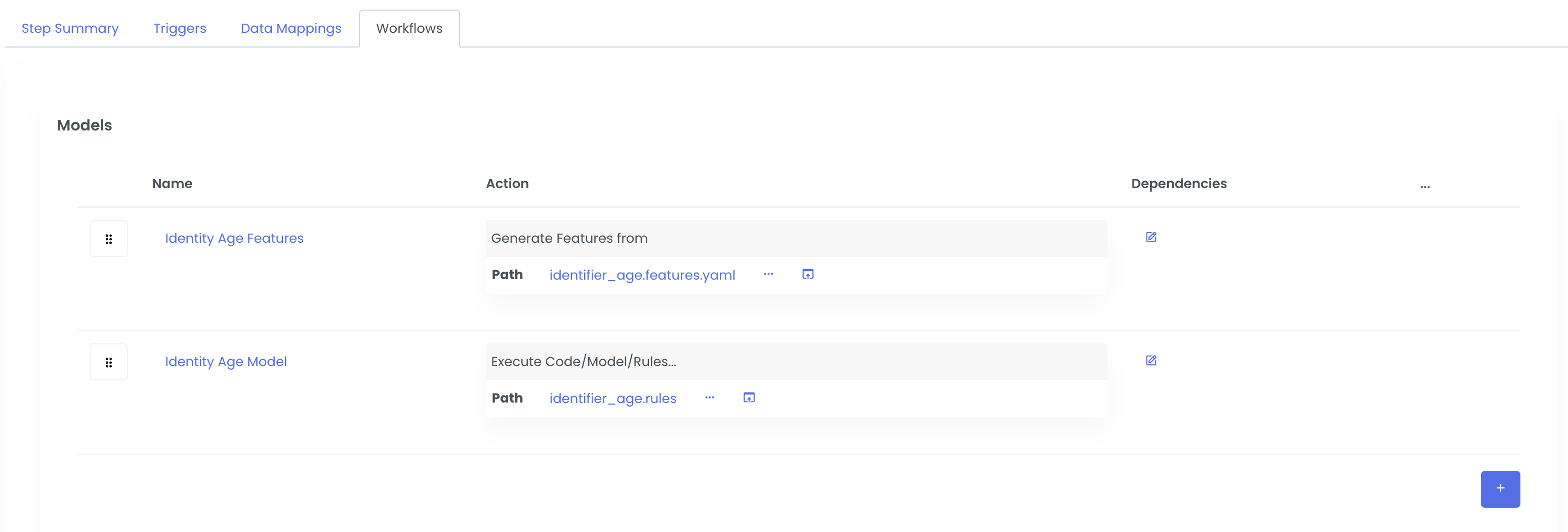
As such, a dependency exists between the "Identifier Age Model" and the "Identifier Age Features" Feature Set. The Features must be computed before the Model executes - there is no way of optimising around this.
Without a dependency configured, the Darwinium orchestration engine will execute both the "Identifier Age Features" Feature Set and "Identifier Age" Model in parallel. The "Identifier Age Features" Feature Set will compute the Features and the "Identifier Age Model" will return an error because the required Features do not exist.
To resolve this, a Dependency must be added to the "Identifier Age Model" to tell the Darwinium orchestration engine that "Identifier Age Features" must complete before the "Identifier Age Model" is run and thus these must execute serially.
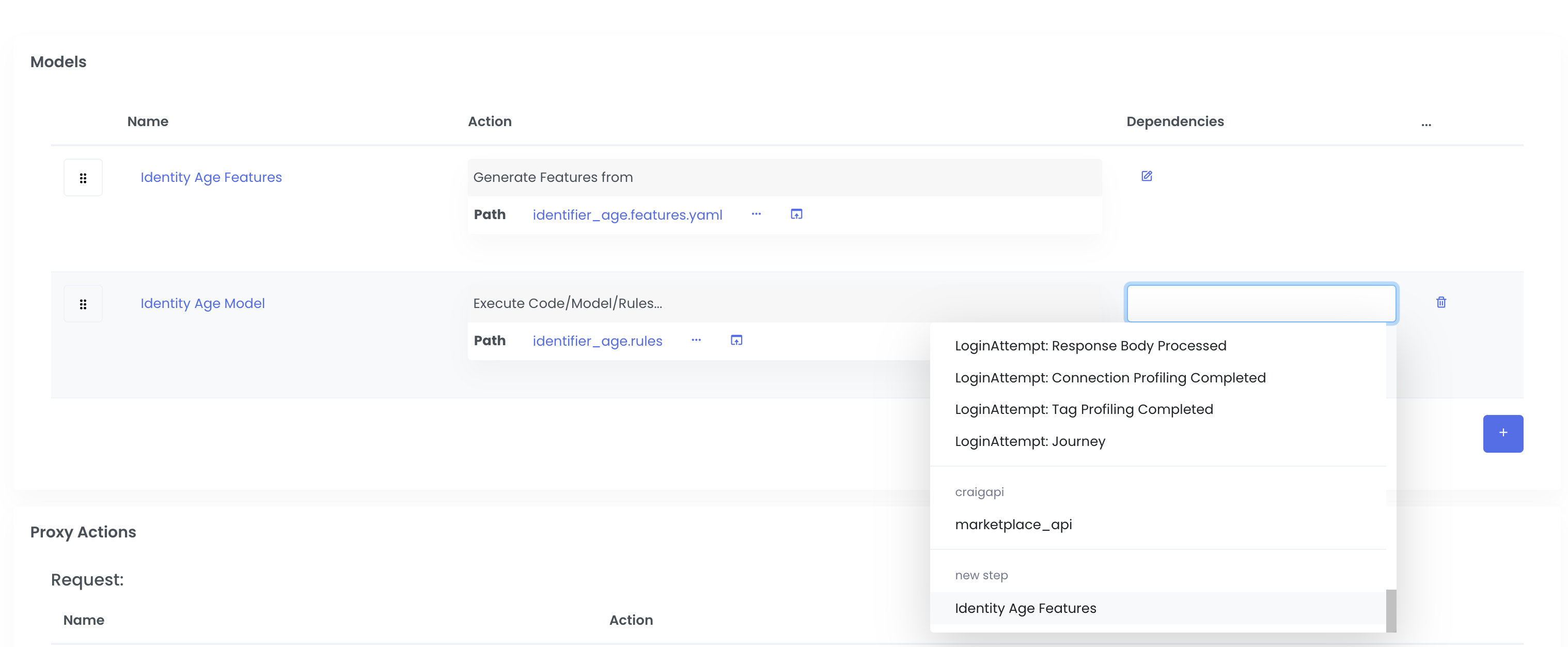
This is done via the the Dependencies section within the Model Workflow.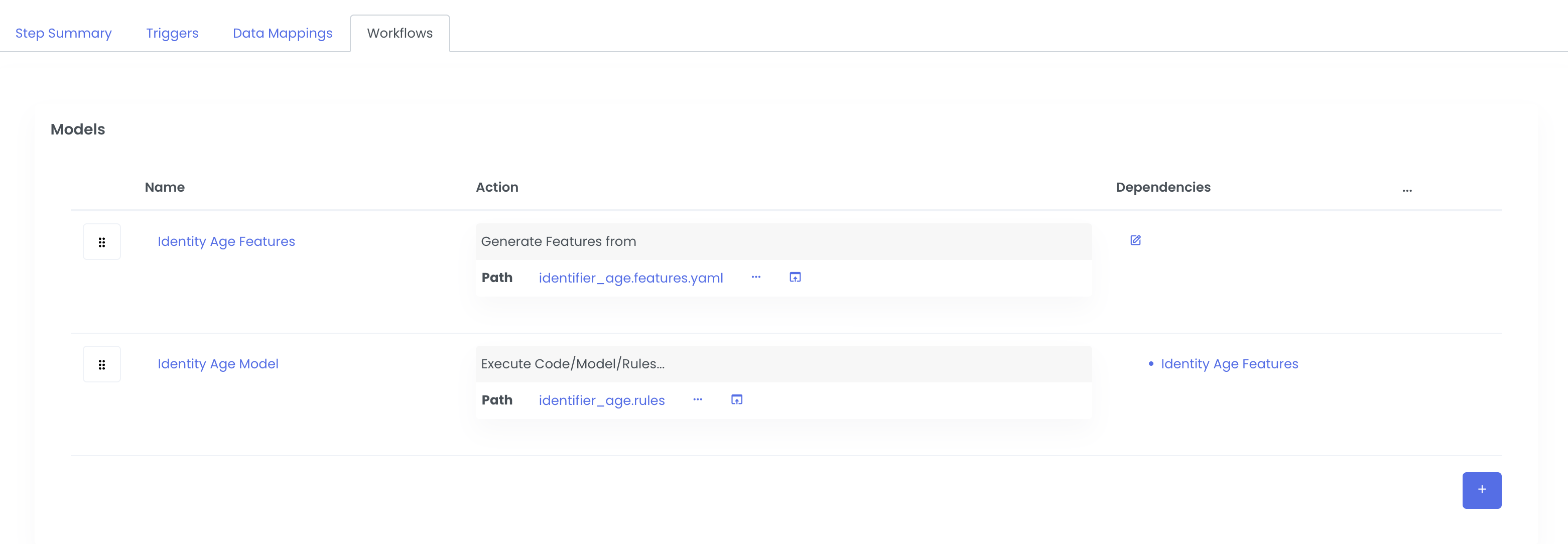
Importing dependencies from another step
You can also import a dependency from a previous step in the journey.
Example: Importing from another step
In a registration flow there may be the following Proxy (CDN) Steps:
- EnterEmail (email is supplied in Request Body)
- VerifyEmail
- CreatePassword
- CreateAccount
If wanting to include email in risk assessment at CreateAccount step:
You would specify: EnterEmail.REQUEST (Request Body processed)
- In Step Summary, under
import event data from dependencies- To make it generally available to the step
- And then In Workflows, next to the Workflow that wants to use it,